Thunderjet - Onboarding plan
- Damien
- Andrei Makaranka
(this is a draft)
This documentation provides some help for backend developers to get started. It is most likely incomplete, so please don't hesitate to ask and add information here as needed.
See also: Overview for a new developer and Newcomer's first steps
FOLIO Design & Architecture
- Okapi : Gateway/Discovery service and Security model - https://folio-org.atlassian.net/wiki/display/~vijay/FOLIO+-+Developer+Onboarding+Guide#FOLIODeveloperOnboardingGuide-Design&Architecture
- RMB framework : Core module for all Vertx based modules - https://github.com/folio-org/raml-module-builder#overview
Introduction to FOLIO Acquisitions
Some demo videos are useful to understand FOLIO acquisition apps (these are using old versions):
See also: Thunderjet - Guidelines for backend code organization, unit tests and Karate tests
Running in IDEA
Installation
- Install Java JDK 17
Install IDEA as IDE : https://www.jetbrains.com/idea/
- Install last version of Vagrant : https://www.vagrantup.com/
- Install VirtualBox : https://www.virtualbox.org/
- Alternative to vagrant/virtualBox using less memory: BusyBee
- Install Postman: https://www.postman.com/
- Clone from git modules and add all of them in one IDEA project
- ThunderJet back-end modules : mod-orders, mod-orders-storage, mod-invoice, mod-invoice-storage, mod-finance, mod-finance-storage, mod-organizations, mod-organizations-storage, mod-gobi, edge-orders, edge-common, mod-ebsconet, acq-models
- Modules with integration tests: folio-integration-tests(Karate), folio-api-tests(Postman)
- Up FOLIO platform by using one of the box :
- Back-end + UI : https://app.vagrantup.com/folio/boxes/snapshot
- See build times at https://dev.folio.org/guides/automation/#reference-environments
- Configure VitualBox and IDEA for running FOLIO microservice from IDEA : How to run folio backend modules with IntelliJ Idea and interact with Vagrant box environment
IDEA project / modules organization and plugins
In IDEA, a single project can use the acquisition git repositories as modules. It can use a project directory containing all the git repositories.
A module is added with the Maven configuration. After compile, the directory target/generated-sources should be set as a generated source folder for the module.
The following plugins can be useful: Cucumber for Java, Gherkin, YAML.
Module deployment
The mod-invoice and mod-invoice-storage modules are not included in the testing VagrantBox VMs, so it's easier to practice deployment with these modules:
Download Postman collections with all necessary requests or create it by yourself. The storage module should be deployed before the business one: mod-invoice-storage and then mod-invoice.
Deployment collections
Here is a zip with all the Postman collections to deploy modules.
- "FOLIO VAGRANT local.postman_environment.json" → All request in the Postman collections use variables from Environment configuration.
Please import this environment configuration with predefined values of variables : {{protocol}}, {url}}, {{okapiport}}
- "Add okapi permission to diku_admin.postman_collection.json" → After you started VagrantBox, then you should add "okapi.all" permission to give ability to deploy modules by "diku_admin" user.
"Redeploy-invoice-storage-module.postman_collection.json" → Please use this collection to deploy mod-invoice-storage
Deployment Steps
- On Linux, use this first:
sudo ifconfig lo:1 10.0.2.15 upsudo ifconfig lo:0 10.0.2.2 up Assign “okapi.all” permission for diku_admin
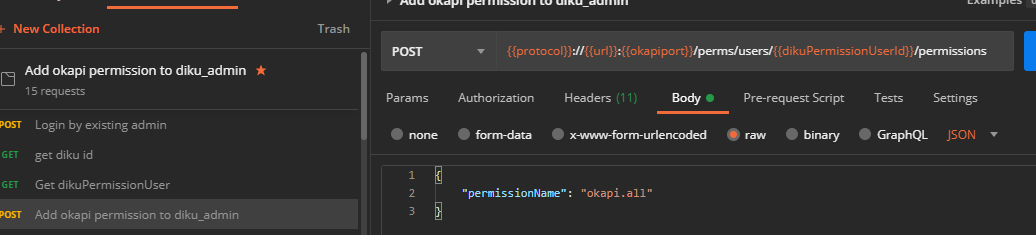
Login

Build mod-invoice-storage module : mvn clean install. As a result target/ModuleDescriptor.json is created, which will be used as deployment descriptor for your microservice.
Copy ModuleDescriptor.json into body of “POST Module Descriptor” and run request
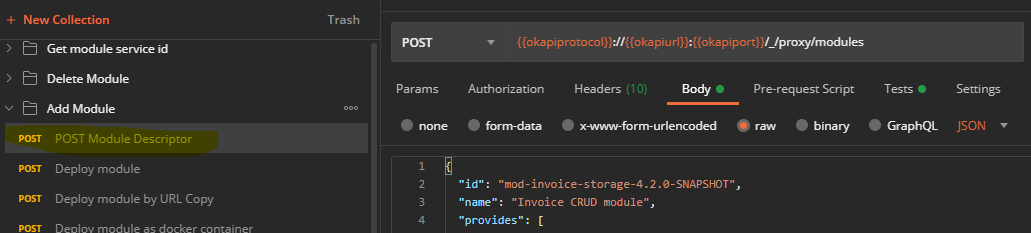
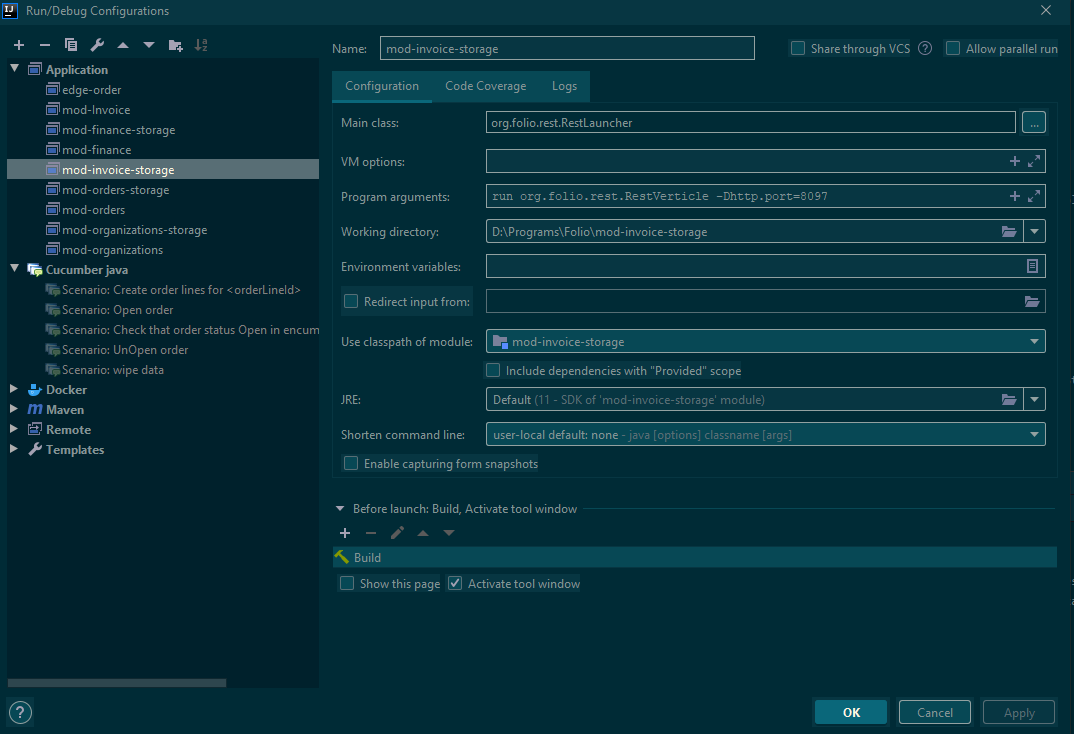
Run module from IDEA
Let OKAPI (Api Getway and discovery server) know were is your microservice by send request
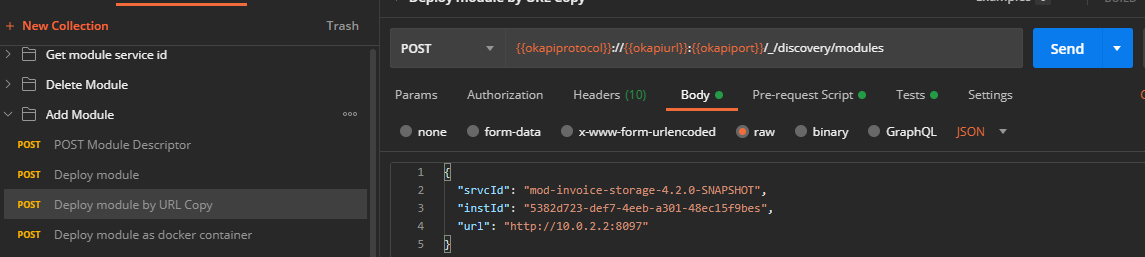
Important:“srvcId” and “id” from deployment descriptor must be the same
Port in “url” must be the same with port from IDEA configuration “-Dhttp.port=8097”
Make the microservice accessible from the outside and allow access to it
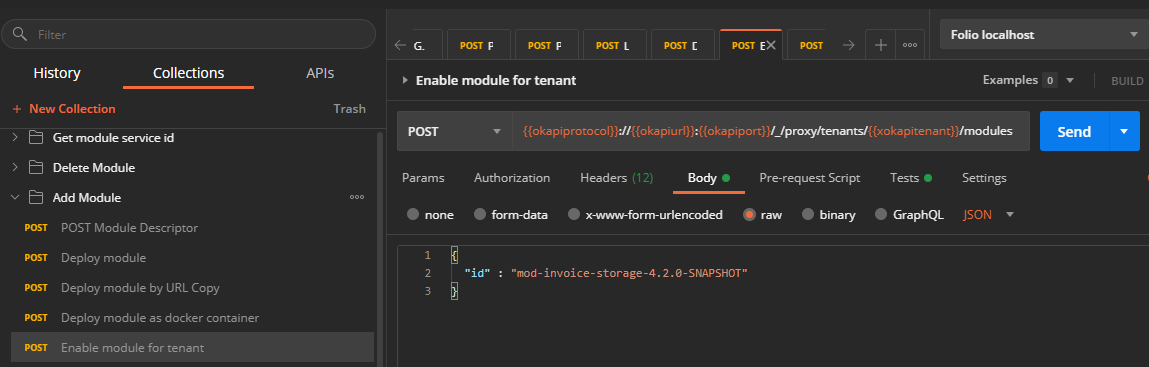
If everythigs fine – start using APIs
If a module was already deployed and a new version needs to be tested for integration tests, it is not necessary to remove the old version: simply add .xxx to the id in the descriptor, with a number higher than the currently deployed one, and the karate tests will automatically use the latest version.
! Important (issue with module upgrade and load sample and reference)
Debugging
Modules can be executed in debug mode in IDEA, they just need to be deployed as described above.. Unit tests can also be debugged in the same way.
change log level for mod-invoice-storage:
http://localhost:8097/admin/loglevel?level=INFO&java_package=org.folio.rest.persist.PostgresClient
Postgres log:
edit /etc/postgresql/10/main/postgresql.conf
log_statement = 'all'
then use SELECT pg_reload_conf();
check log at /var/log/postgresql/postgresql-10-main.log
copy to host with:
vagrant ssh -c "sudo cat /var/log/postgresql/postgresql-10-main.log" >postgresql-10-main.log
Creating and running unit tests
Unit tests are executed with Maven. The files are in src/test.
Tests are using Mockito, RestAssured, JUnit and Hamcrest.
Troubleshooting
Problem with unit tests:
- clean + restart IDEA (422 error connected with aspectj-maven-plugin)
- also try vagrant halt
- remove src/main/resources/postgres-conf.json from resources + mvn clean compile (was useful for mod-finance-storage)
put it back afterwards and recompile (it's needed to run storage mods)
Creating and running integration tests
Integration tests used to run with Postman, but Karate is now used instead.
Create karate tests in folio-integration-tests (this should be started before submitting a PR, to check results).
See for instance folio-integration-tests/acquisitions/src/main/resources/domain/mod-finance/features/ledger-totals.feature
Use @parallel=false at the beginning if the scenarios should be executed one after the other as opposed to in parallel.
Use Postman to update the module descriptor and run it in IDEA, then run the integration tests with IDEA (TODO: more doc about that).
Troubleshooting
Error when running tests:setup-users.feature:105 - status code was: 422, expected: 201, response time: 18, url: http://localhost:9130/perms/users, response: {"errors":[{"code":"-1","message":"Unable to update derived fields: Attempting to add non-existent permissions invoice.all to permission user with id 4334831c-02d7-4936-849c-2f44d5491300","type":"1",
-> just deploy mod-invoice or whatever permissions are required for
Permission problems, for instance2021-05-19T14:00:10,684 ERROR [vert.x-eventloop-thread-1] RestClient Exception calling GET /organizations-storage/organizations/c6dace5d-4574-411e-8ba1-036102fcdc9b - org.folio.rest.core.models.RequestContext@4286b5d9java.util.concurrent.CompletionException: org.folio.invoices.rest.exceptions.HttpException: Access requires permission: organizations-storage.organizations.item.get
-> Check descriptor (clean+compile), redeploy, restart the vagrant box
maven-resources-test:mod-finance-storage: java.lang.OutOfMemoryError: Java heap space
-> Increase Settings - Build, Execution etc - Compiler - Shared build process heap size and reload all projects
PR workflow
API and module versions
When modifying the API in ModuleDescriptor-template, update the API version number in the related path in it, for instance:
"id": "finance.transactions",
"version": "4.2",
Make a field required -> major API version (for storage + business)
Change a pattern (validation) -> no API version change.
Migration → no module version change
Major API version change -> major module version change.
Never modify pom.xml or NEWS.md unless this is a release PR.
Basic git operations
(assuming the JIRA ticket worked on is "MODORDSTOR-212")
Create the new branch locally:git checkout -b MODORDSTOR-212
(even if there are changes: they will be moved to the new branch)
(if that doesn't work, try "git switch -c <new-branch>")
Commit changes:git add . (to undo, use git reset)git commit -m "[MODORDSTOR-212] ..." (to undo, git reset HEAD~ )
Push to the repo the first time (this is reminded when using simply "git push")git push --set-upstream origin MODORDSTOR-212
after:git push
To go back to the master branch:git checkout master
Finish the PR creation on github
Go to the repo on github, use the new Create pull request button.
See sample at https://github.com/folio-org/mod-orders-storage/pull/230
Assign PR to myself.
After PR is created
Fix code smells etc.
If the build fails with continuous-integration/jenkins/pr-merge, try to click login and rerun buttons on top in jenkins.
Attach a screenshot with Karate tests to show it does not introduce a regression (no new test needed at this point).
Add folio-org/acquisitions team to reviewers on github.
Change JIRA ticket to "Code review".
After the PR is approved by 2 people, the initial poster has to merge it.
Merge with master before if needed.
Check boxes in the PR.
Squash&Merge PR.
After the pull request is merged in github:
Change the "Fix Version" (version can be found in pom.xml, just remove "-SNAPSHOT") and change JIRA ticket to "Review".
Ticket is still assigned to me.
Tests
Create a new PR for the karate tests in folio-integration-tests, with a screenshot of the test results, using the same branch name based on the JIRA ticket.
Possibly test user interface and add a comment to the JIRA ticket about how to test.
Review
Set the JIRA ticket "Assignee" to "Unassigned".
Based on your steps other guy from team will recheck it again and close if everything fine.
Vagrant boxes are usually updated on the next day after merge; if unavailable, use local vagrant box.
Use https://folio-testing.dev.folio.org/ or https://folio-snapshot.dev.folio.org/ to run integration tests.