Karate testing pipelines
- Vitaly Demchenko
Karate tests pipeline
This is a job to launch karate tests against existing environment - https://jenkins-aws.indexdata.com/job/Testing/job/Karate%20tests/
Job parameters:
- branch - karate tests repository branch to checkout
- modules - comma separated list of modules to build(no spaces). Karate tests is a multimodule Maven project, using this parameter you can specify exact maven modules to be build. If no value is provided than all the modules will be built.
- threadCount - number of parallel thread to build. Uses maven parallel build capabilities (https://cwiki.apache.org/confluence/display/MAVEN/Parallel+builds+in+Maven+3). Note: karate tests also can use multithreading inside.
- okapiUrl - target environment OKAPI URL
- tenant - tenant name for tests
- adminUserName - admin user name of the ${tenant}. This user will be used to create a new tenant for each test, so it must have appropriate permissions
- adminPassword - admin user password
- prototypeTenant - a name of the tenant which will be used by karate tests as a prototype during new tests tenant creation. Specifically to determine versions of the modules which should be activated for test tenant
Job steps:
- Checkout karate tests repository
- Build karate config - prepare "karate-config-jenkins.js" which is used to provide parameters(url, tenant, user, some secrets) to karate tests
- Run karate tests - execute maven build
- Publish tests execution results - publish cucumber and junit reports
- Archive artifacts - executed only if job has been triggered by another job - archive karate, cucumber and junit tests result files
Scheduled karate tests pipeline
This is a job which creates a new environment, launch karate tests against it, drops environment, sends tests results notifications and creates Jira tickets - https://jenkins-aws.indexdata.com/job/Testing/job/Scheduled%20Karate%20Tests/
This is job is designed to be triggered by cron.
Job parameters:
- branch - karate tests repository branch to checkout
- threadCount - number of parallel thread to build. Uses maven parallel build capabilities (https://cwiki.apache.org/confluence/display/MAVEN/Parallel+builds+in+Maven+3). Note: karate tests also can use multithreading inside.
Scheduled run parameters values:
- branch - master
- threadCount - 4
Job steps:
- Create environment - execute https://jenkins-aws.indexdata.com/job/Rancher/job/Project/ to create a new "karate" environment on "folio-testing" cluster. Folio configuration is taken from "platform-complete" repo, "snapshot" branch.
- Run karate tests - execute https://jenkins-aws.indexdata.com/job/Testing/job/Karate%20tests/ against environment created on previous step
- Destroy environment - execute https://jenkins-aws.indexdata.com/job/Rancher/job/Project/ to destroy "karate" environment on "folio-testing" cluster
- Copy downstream job artifacts - copy karate tests execution results to current workspace
- Publish tests execution results - publish cucumber and junit reports
- Collect execution results - iterate over "karate-summary-json.txt"(generated by karate framework) to collect data regarding specific tests execution details. Then iterate over all cucumber htmls generated for test execution to match data from "karate-summary-json.txt" with a specific test report html file.
- Parse team assignment - parse data regarding module-team assignment from "teams-assignment.json" file.
- Send slack notifications - send slack notifications regarding failed tests to team channels
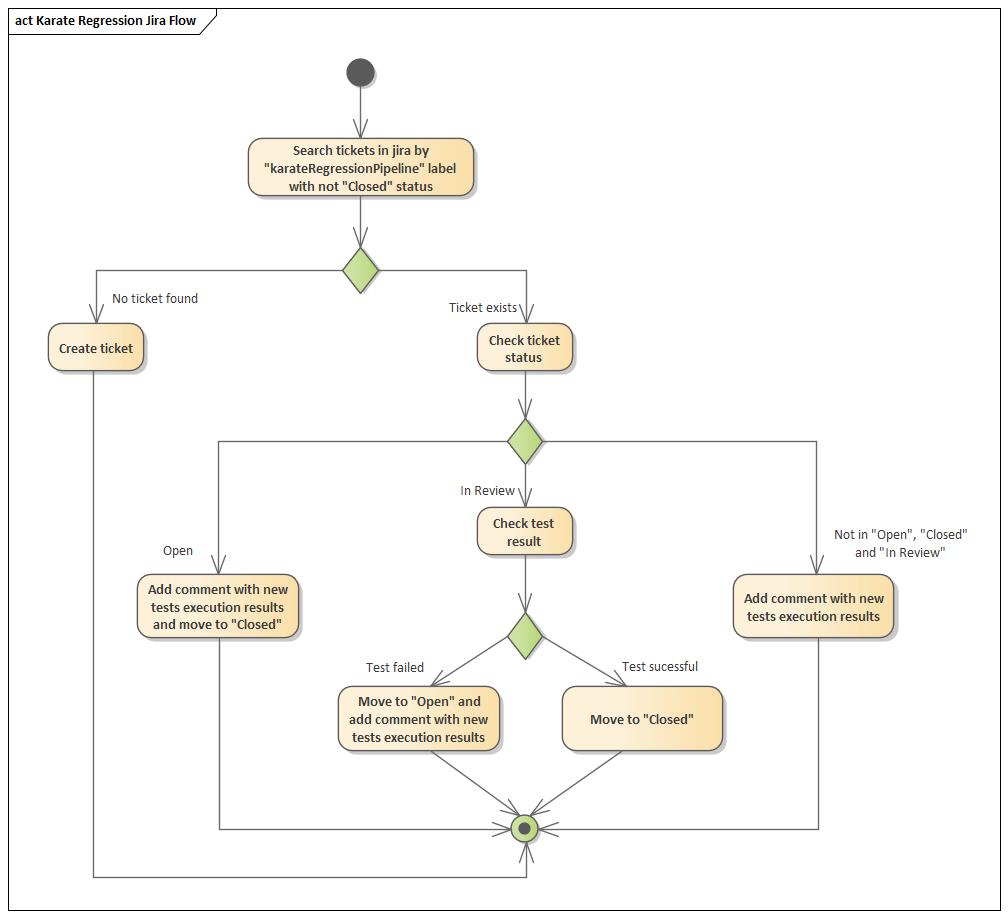
- Sync Jira tickets - synchronize failed karate tests Jira tickets - create/update/close karate tests Jira tickets according to tests results.
Karate Jira tickets flow
All tickets are created in "AQA" Jira project with "Bug" type and "P2" priority. Also all tickets have "karateRegressionPipeline" label. If team is specified for a karate test module in "team-assignment.json" file then appropriate team name will be set to "Development Team" field.