Acquisitions/Resource Management implementers
- Kristin Martin
- Sara Colglazier
- Marie Meyer
- Please add questions and topics here. Topics or questions posted in slack will be added here as well.
Resource Management/Acquisitions implementation topics, questions or issues
Topic Status legend:
OPEN - To be discussed
BLOCKED - The group is waiting for further information or some specific action to be completed before progress can continue
IN PROGRESS - Discussion is ongoing and work is potentially in progress
CLOSED - Discussion resolved and required actions completed
How to contribute to other people's discussion topics:
- Do not add detail to closed or discussed topics as your comments may be overlooked. In this situation, it might be best to Add your details as a new topic and reference the previous topic.
- To contribute to an existing topic. Add a new paragraph to the description column.
- @mention yourself at the beginning of the paragraph
How to indicate you are also interested in a topic:
- @mention yourself in the "Interested parties" column and add your institution name
How are topics archived:
When a topic status is set to closed by it's "Owner". The topic must also be moved to the "Acquisitions/Resource Management implementers Archive" page.
- Copy the topic and paste it at the top of the Archived topics page that is nested under this page
- Delete the topic from this page

Active Topics
| # | Topic | Status | Description/ use case | Date added | Discussed on | Provided by Name, Institution | Interested parties | Has been discussed in meeting: Link to agenda/ minutes | Action required |
|---|---|---|---|---|---|---|---|---|---|
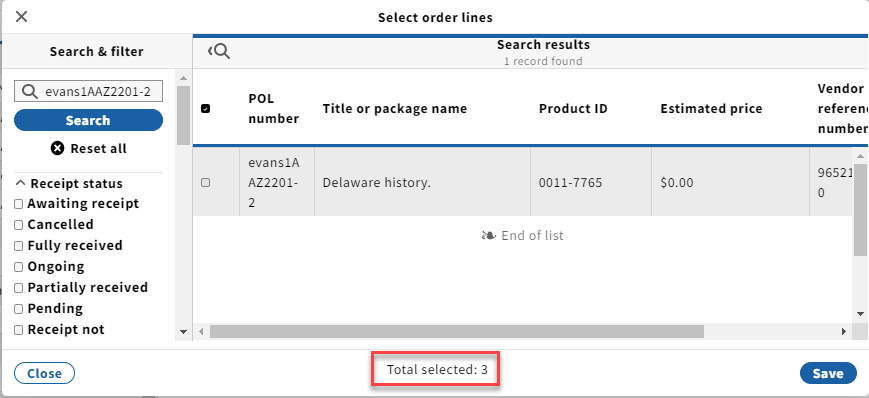
| 33 | Invoices: Add POL "Select order lines" - show all before save | IN PROGRESS | Invoices app > Invoice lines > Add > Search by POL number, select the POL, repeat. We are glad that the "Select order lines" process allows us to search for and select multiple POLs before clicking "Save" and we see the total number selected at the bottom; however, we can't see the list of selected POLs before we save. The user is likely to search by POL number, not by vendor since there would be too many results to scroll through. As they search one-by-one for each POL and select each one, it would be helpful to see the list of POLs that they've already selected and have the opportunity to unselect any mistakes before clicking "Save." The current flow leaves the user feeling unsure since they can't see which lines they've selected already.
| 11/15/2021 | Julie Brannon (old account) | Need to explore possible design solutions Dennis Bridges to reach out to Kimie about design | |||
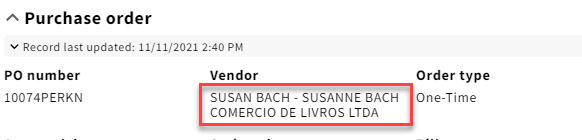
| 35 | Order and Invoice: Link to vendor Organization record | IN PROGRESS | Low-priority request: On the order and invoice could the vendor field be upgraded from static text of the vendor name to an active link so that the user can easily click through to view the full organization record for the vendor? This type of linking is very helpful in other fields on the order such as the Fund, Title, and Related invoices.
| 11/19/2021 | Need to create enhancement Dennis Bridges consider what to do in the header with previous story re displaying vendor code rather than name. | ||||
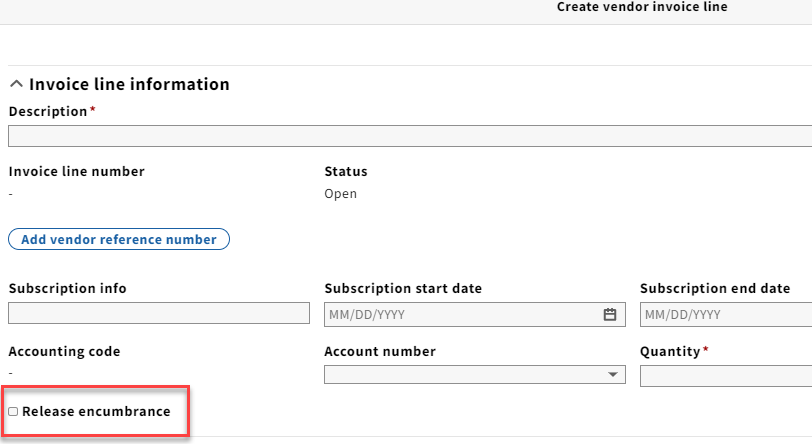
| 36 | Invoices: Add adjustment - Release encumbrance defaults to "unchecked" | IN PROGRESS | Invoices >Invoice lines > New: The default value for the "Release encumbrance" checkbox is unchecked on the create vendor invoice line screen (which is used when the user is not linking to an existing POL). Could we discuss reversing the default value to "checked" since this could trip up users who don't check it and then have dangling encumbrances. The original thinking for leaving it unchecked was to ensure that ongoing orders didn't get automatically closed by the system. Now that we have the "Ongoing" order payment status and no longer have that issue maybe we could revisit this to set to "checked."
| 11/23/21 | Julie Brannon (old account) | It is standing orders not subscriptions that should default to false because they often have multiple invoices. for subscriptions more often there is one invoice for the year. The default may not be as important than making clear what this toggle will do in documentation. We will have some additional discussion after libraries have had a chance to review. | |||
| 37 | on POL: re: Related invoices | IN PROGRESS | I am confused by what is displayed in the Piece(s) field of the Related invoices for POLs. In my test example here, the pieces listed are not necessarily specific or related to the invoice/invoice line, but seeming just bucket-displaying all the pieces created related to the POL, which is not helpful. I would rather see specific Invoice LINE note info displayed, like: "Renewal. New subscription ; Invoicing period:20220101-20221231 (86-86)" in this case vendor provided and included in the EDI invoice, OR, something I manually enter like: 2022 Hathitrust Membership: Public Domain, versus, another Invoice line for: 2022 Hathitrust Membership: In-Copyright, each with their respective amounts, to help me understand what I just paid for.
|
| As piece information is actually no longer shown in this area it would be helpful to show subscription information in a column here. User may identify in more detail in this field what the sub is for. Also ideally the sub date start and end are shown in the related info. worth scrolling to have this information on hand. This should apply to related invoice information shown on the POL and on the Invoice line See Example in agreements of combined columns in MCL. This could be a way to decrease the width of some of our tables Need to create a story Dennis Bridges | ||||
| 38 | POL/inventory matching | IN PROGRESS | At Chicago, we're continuing to struggle with identifier matches when creating POs. We want to be creating new instances in Inventory, but instead matches are occurring and the new item is being attached to the wrong instance record in Inventory. This is on our test system (running Juniper). We are getting matches when the publisher provides an ISBN in the 024 or a publisher/distributor number in the 028. This is really common for Harrassowitz with music scores. So a short, non-unique publisher number, like "8021" matches multiple records already in Inventory, and then FOLIO picks the first one it finds and attached the new holdings/item. These aren't even the same title, different format - these are two very distinct publications. If you want to see this in action, here's a short video: https://drive.google.com/file/d/1MOnMnF7u-RKb0pmFy80wulCjIfBmnwJ8/view?usp=sharing. One interim solution is to remove any identifiers (which is kind of a bummer, since these can be useful to identifying the material). Lotus will bring the ability to turn off identifier matching. Orders will use all "Product identifier types". These match up to "Resource identifier types" in instance records
It would be good to discuss how we might want matching to work since the current process is way too broad. |
| Perhaps rather than increasing the detail of matching FOLIO could report on the matches that were made? Perhaps specific to source. ie. GOBI. Need to identify specific situations were the matching is failing in order to improve accuracy. Otherwise it might make more sense to focus on improving the visibility of incorrect matches. Dennis Bridges to add detail to Wiki page. https://folio-org.atlassian.net/wiki/x/4QtU | ||||
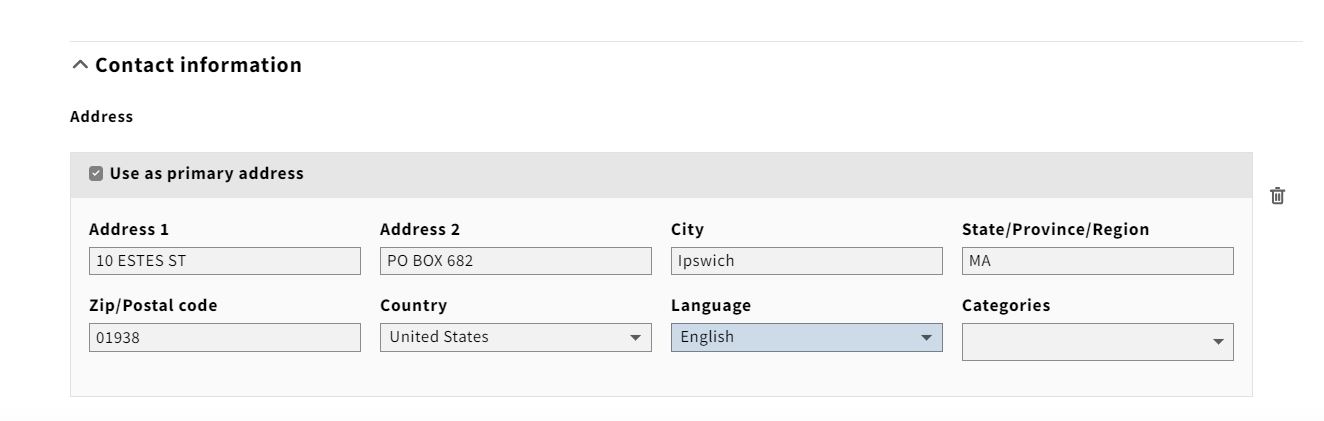
| 40 | Organizations: Add "Name" field on contact information | IN PROGRESS | This is somewhat related to issue #39 above. When migrating our vendor address information from our current system we noticed that there isn't a data element on the contact information address for the "name." We've mapped the various address names to the alternate/alias name in FOLIO just to store them somewhere. Similar to #39 above, we need to store the first line of the address (the name) since it is usually more specific or slightly different than the organization name we store in FOLIO and isn't necessarily the same for shipments vs. payment vs. claims. | 12/16/21 | Julie Brannon (old account) , Duke | Multiple organizations had to be creative with migration because of the lack of fields for address info. The additional field for address details could be an "Attention" or "Department". It might be helpful to have an additional Address field and a separate name field. Dennis Bridges to create story | |||
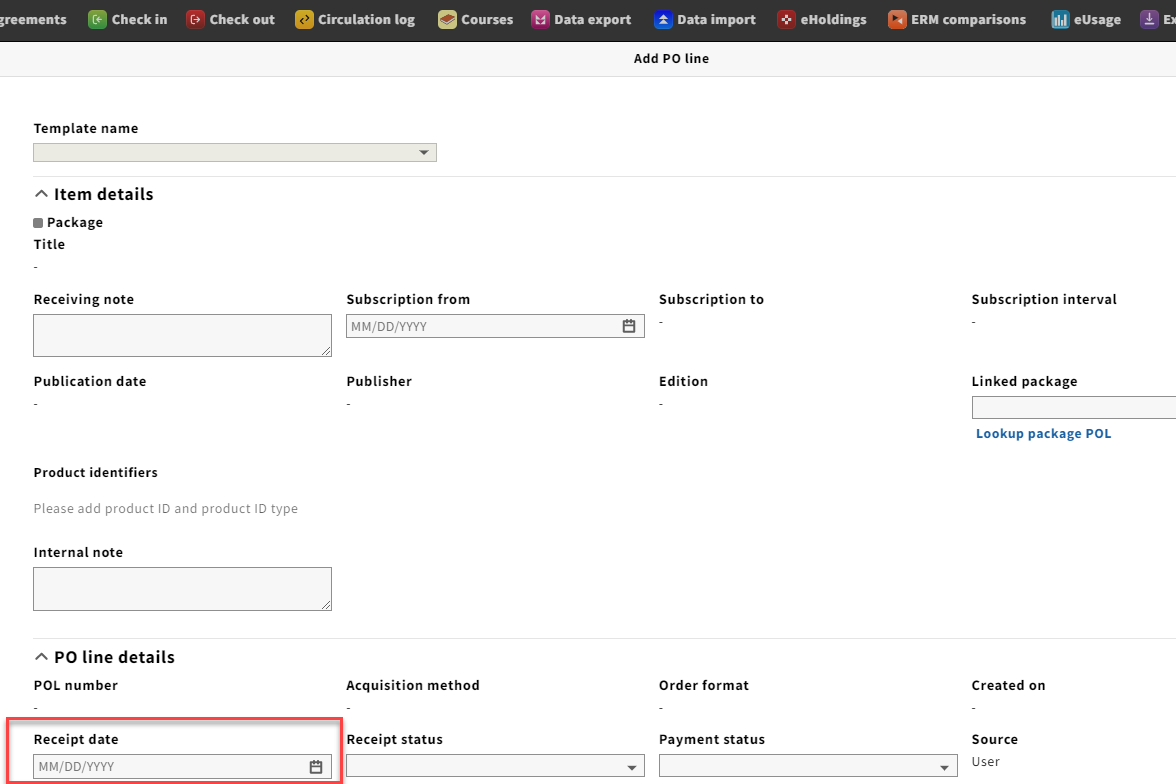
| 44 | Orders: Add order POL Receipt date - why editable? | IN PROGRESS | Orders > add PO line: Why is the "Receipt date" an editable field when creating a new PO line? If the user enters a receipt date this could cause confusion since the order hasn't actually been received through the Receiving app. Unless there are use cases for editing this field during PO line creation, could it be changed to an inactive field on this form to avoid mistakes and confusion? Screenshot to show that the "Receipt date" is editable on the Add PO line form:
Screenshot showing the PO Line details window after saving a new PO line with the receipt date populated and Receipt status showing "Awaiting Receipt" since the order hasn't been received yet through the Receiving app.
| 1/11/22 | Julie Brannon (old account) , Duke | Dennis Bridges to review logic for updating POL receipt date based on receiving actions. Review how this setting affects receipt status. For approval orders, a user may actually want to set the receipt date for the POL when creating the order. Clarify and discuss results of review with SIG. | |||
| 45 | POLs and Invoice lines: subscription dates. | IN PROGRESS | Prompted by a question from Kimberly Pamplin at Texas A&M in slack on 1/12/22: "I notice that the "renewal date" and "subscription to" dates cannot be edited once an order is opened. Is it intended that these dates will update automatically? If so, what triggers them? I notice for example that filling in the subscription to and from fields will then populate them for invoice line creation, but I'm not sure how they are supposed to be updated once a subscription year is paid for." Also from Julie Brannon at Duke: The field labels are inconsistent between orders and invoices for these dates even though data flows from the order line to the invoice line. Is there a reason they're different, because if not, we should probably keep them consistent between apps: Order line: Subscription from, Subscription to | 1/12/22 | Dennis Bridges create story for allowing user to edit order subscription to date. | ||||
46 | Control default values in Settings | IN PROGRESS | Prompted by Slack discussion on 1/15/22. Request to control default values in settings. This relates to topics #24, #32, and #36 on this page. The ability to control default values for key fields in the Orders and Invoices apps would enable libraries to align the UI with their needs and improve the user experience. Eg. Checking the re-encumber checkbox. The library does a lot more orders that do not encumber and this was taking time and effort when creating orders. it can also be error-prone. Not using order templates for all orders. Eg. In invoices, we consistently have to remember to check "Lock Total" and uncheck "check subscription overlap" for different orders. Eg. Also need to remember to adjust "Export to accounting" checkbox and new Invoice line > "Release encumbrance". | 1/18/2022 | Dennis Bridges to create wiki page for collecting use cases for additional default settings. Users will add more detail to the description here. | ||||
| 51 | Create Contact person or interface on organizations | IN PROGRESS | When a user creates a new organization record and wants to add a new contact person or interface, the user needs to save the organization record first. In a second step the user needs to edit the organization record again, click on "add contact" to then create and link the new contact person (or interface). For a more fluent workflow with less clicking it would be helpful to be able to create a new contact or interface without needing to save the organization record first. |
| Dennis Bridges to review with development team to see if it is possible to implement a save and continue when you have a "dirty form". Option 2 would be separating the contact people and interface creation and assignment from the editing organization. Argument for is that often times reassigning a person involves editing their email etc. | ||||
| 54 | Capturing binding information for order and receiving so records can be filtered by this data | IN PROGRESS | We would like to have a way of identifying Titles that represent material that will be sent for binding at a given point in the year–for example, in Receiving if there were a check box at the Receiving Title Record level for To be Bound or Bindery that one could then Filter on. We now include information in the Receiving Note that indicates that the title is a Bindery title, but one cannot search on the Receiving Note in the Receiving App. (I suppose we could use a Tag, but ...) It would be better if what indicates that the Title is a Bindery Title could be seen and filtered on from both the POL and Receiving Title record. ... Something more like the Rush or ?? I have a monthly magazine that I receive and at a certain point of the year when I have all issues for the year they will be sent to the bindery. What we plan to bind is revisited over time as the budget fluctuates. Some titles may no longer be bound to say money. Understanding what is being bound in orders in helpful for making purchase decisions. The information may also change over time so ideally these are editable at any stage of the orders lifecycle. Users that actually carry out the binding need this information in the receiving area to gather materials that need to be bound. Users need to access receiving to identify what needs to be bound. They also need information about how to bind and when (how long to retain issues before binding, how many issues to bind in a volume, whether to bind or discard etc.). Need to know a little more about how the user finds what needs to be bound and what historical information they need about this activity in receiving. |
| edited/updated 2022-09-26 | The limitation of tags for this use case is that they need to be applied in Orders and Receiving separately. More work and more prone to error. Dennis Bridges Create wiki page with use cases. Need feature for Capturing Binding information for order and receiving. Joseph Reimers Created wiki page with workflow description | |||
| 57 | Finance: Currency setting for fund | IN PROGRESS | The Finance > Fund displays a currency value which isn't editable during fund creation and is set to the primary currency set in Settings > Tenant > Language and localisation. Do any institutions need to have some funds desingated as a different currency than the tenant? I'm thinking through how to handle funds for Duke's campus in China and they would likely prefer to set up their funds with ¥/CNY/yuan as the basis rather than $USD. Update 8/17/22: Duke's campus in China will operate using their own instance of FOLIO, so this question is no longer relevant for Duke. |
| Julie Brannon (old account) Duke University | A logical approach here would be to expose the currency setting at the fiscal year level such that users could explicitly set it when creating a fiscal year. Dennis Bridges Need to create a JIRA. | |||
| 58 | Action performed on record bounces user to the top. | OPEN | In invoices when you access an invoice line to review or edit and close out of the invoice line, it will bounce you back to the top of the invoice. PLEASE ADD MORE INFORMATION AND INCLUDE YOUR NAME SO WE KNOW WHO TO ASK FOR DETAILS. THX! | ||||||
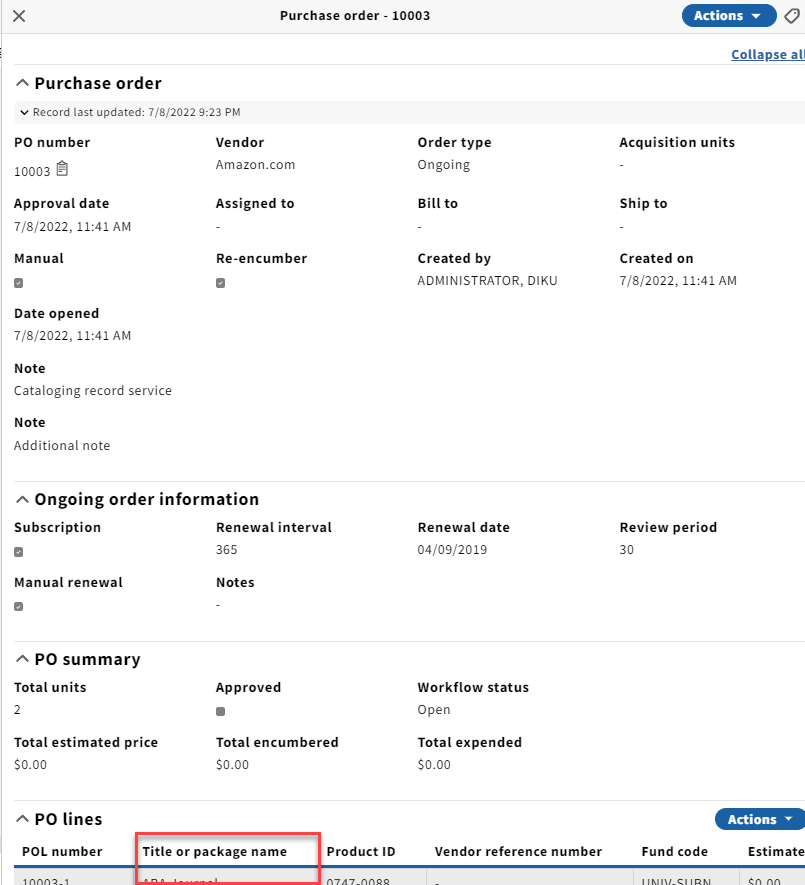
| 60 | Orders: Move PO line accordion | IN PROGRESS | Orders UI: For ongoing orders we usually have to scroll down while viewing the PO Details screen to see the title information since there is an additional accordion section for ongoing orders. Could we discuss whether the layout could accommodate seeing the PO line titles further up since titles are such a critical data element when looking at orders? Maybe this is more challenging for institutions that have multiple PO lines, but for those with one PO line per order this could be a valuable user experience improvement.
Title sometimes appears below the fold which makes it difficult to find. Adding multiple notes to the PO accordion pushes the POL accordion down even further. Some users will increase font size (Zoom in) which also pushes the POL accordion off of the screen. |
| Julie Brannon (old account) Duke University | If the notes were to be collapsed by default with only one showing it would be helpful to include a bubble that shows how many there are. Bill to and Ship to can also be very long and could be truncated by default or something like that. On-going order information could potentially be shifted down. The subscription field would need to be kept near the top. It is key information for ongoing orders and should not appear below POLs PO summary could be collapsed into the PO accordion to save space. Dennis Bridges need to review with Kimie Kester | |||
| 61 | Receiving: Receiving title are not removed when package POL instance links are changed | IN PROGRESS | The only way to remove Receiving titles is to delete the POL. With Package POLs you may need to clean up the receiving titles but not want to remove the POL. Titles can even be linked in error and there is no way to correct that without deleting the entire POL. There are circumstances where we want to keep the receiving record and some when the user does not want to keep it. May have originally ordered a specific version from Amazon as a rush. Circumstances change but user wants to keep the order history so it can be communicated to the requester. In this case the Receiving title would need to be removed and the more relevant instance connected. | July 15, 2022 | Sara Colglazier | Dennis Bridges to create JIRA for review. need to consult devs about ability to remove R Titles. | |||
| 64 | Receiving against closed POs. | IN PROGRESS | Prior to the end of our fiscal year, we closed all paid POs, so that they wouldn't re-encumber on rollover. Now we are receiving the pieces. For our monographs, this is working fine. The POL Receiving workflow was set to "Synchronized order and receipt quantity" and when the item is received, the POL Receipt Status does get updated to "Fully Received" and the PO remains closed. But for some individual series volume orders (which are one-time orders), the orders staff coded them as "Independent order and receipt quantity." Now staff are creating the piece(s) to be received and receiving it (them). This is creating two problems: 1.--the Receipt Status becomes "Partially Received" but there is nothing else to be received. 2.--the PO reopens (ack, ack, ack)! We can go to the POL, edit and change the status to "Fully Received" and this will close the PO again, but we would prefer to have the PO remain in a closed state. Dennis suggested on Slack: It’s the change in status that triggers the PO workflow status to change. Perhaps the receipt status should not be updated when receiving pieces against a closed order. OR the only update made should be to “Fully received” which would close the order if it wasn’t already closed. We like the second. We are using the "Awaiting Receipt" Status to track items to be received, so we wouldn't want to leave the POL in an Awaiting Receipt status. Requirement: The PO does not reopen when receipt continues against a closed PO. This was found in Lotus. We believe it is the Adding and receiving of a new piece after order was closed that confuses the system and changes the receipt status and opens the PO. |
| Dennis Bridges to retest in current release and create JIRA bug. | ||||
| 67 | Order templates: Hide tags | IN PROGRESS | We love the new hidden fields options in Settings > Orders > Order templates. We'd like to hide tags and wondered why the PO Tags and POL Tags and aren't "hideable"? Could we add that functionality in the future? Note: The tags functionality can be hidden completely across all of FOLIO if it is not needed in any application. Desire the ability to disable tags in the order and order line such that users are not able to apply them to orders. Tags are currently difficult to manage and we would like to prevent users from making a mess now that could be difficult to clean up in the future. |
| Question: Are other libraries interested in hiding tags from the orders interface but not other applications? Create a feature for allowing users to hide tags from orders and order lines. It would be logical to incorporate this into the hidden fields functionality of the order template. | ||||
| 68 | Receiving: Don't display "Receipt not required" orders | IN PROGRESS | We're wondering why records display in the Receiving app for orders that are created with a Receipt status = "Receipt not required"? We're not seeing anything in the receiving app record to indicate that the order is a "Receipt not required" order, so they wouldn't know from the Receiving app that this order was set to "Receipt not required." Use cases for packages:
|
| When a POL has a receipt status of "Receipt not required" the Receiving title should be hidden from the result list. Note: currently this is the only place you can see package POL titles. Not able to search POL by package title. Dennis Bridges need to create story for not displaying title with POL receipt status "Receipt not required" by default. Package POL titles can be marked as "Receipt not required" but users still want to find them. | ||||
| 71 | Invoices: Display of fund not always available without scrolling to the right | IN PROGRESS | When approving invoices if the description is long I need to scroll right to view funds. Far better would be to move the fund next to the POL number or allow for customization of displays. The description is not something we want to completely remove. However, it can be unnecessarily long and could be truncated or wrapped at 30-50 characters. (group seems to favor truncation) Allowing users to adjust the order of the columns would be another desirable solution if it persists at least for a session. Ie. it is persisted as you move from one invoice to the next. Other Fields users are often scrolling to see: Total price, PO status. | Jan.1, 2023 | Scott Perry UChicago | Mich State | Dennis Bridges to discuss with design team and create a JIRA issue for proposed solution. | ||
| 89 | Export organization records to CSV | IN PROGRESS | In light of other developments to the export of acquisitions information under UXPROD-2665 - Getting issue details... STATUS , I have had several libraries ask about the ability to export organization information to a CSV file to support periodic review of contacts, interfaces, and account information. It's also been noted that in other apps supporting export to CSV, notes added via the Notes app are not included in export. This may be a larger discussion, but I wanted to at least raise it here to facilitate that conversation wherever it ultimately needs to happen. |
| April 11, 2023 | Molly Driscoll | Related feature is UXPROD-4164 - Getting issue details... STATUS which would probably satisfy these requirements but may not be the ideal workflow. I recommend we revisit this requirement when that feature is reviewed with the group. | ||
| 91 | Invenvtory: adding additional acquisition data in the item record | IN PROGRESS | To have a quick overview of frequently needed information and to avoid of "jumping" between multiple apps, it is desired to have additional acquisition data displayed in the "acquisition" accordion of the item record. Requested are:
Use case: User looses item (Ie. a physical item) and needs to know how much they will need to pay for it. Ideally this cost data would be an accurate cost for the item from the invoice app
|
| April 25, 2023 June 27, 2023 July 7, 2023 | Sven Thomsen | André Hohmann SLUB Dresden | ||
| 99 | Building invoices from smaller vendors: embedded MARC | IN PROGRESS | UXPROD-663 - Getting issue details... STATUS is about building invoices from embedded MARC. This is functionality we've been waiting on, because we are using an external tool with Google scripts which is not a good long term solution and has limitations. EDI invoicing will be helpful, but we have many smaller vendors/approval plans where the vendor can't supply EDI, and we are not staffed to manually enter these invoices. Could we get an update on when this will be scheduled? And what are other libraries doing without this functionality? Other libraries like GBV are also interested in other formats like XML (They are using PICA XML) for creating invoices as EDI is not always possible. Standardized common formats for electronic invoices in Germany are XRechnung and ZUGFeRD. They mainly affect financial systems but it is important for German libraries that FOLIO will support invoice import not only for EDI but also for different formats. |
| Aug.8, 2023 | University of Chicago | Julie Brannon (old account) Duke University | Group has decided to invite Ann-Marie Breaux (Deactivated) to join discussion and work through use cases to make sure all necessary features are created. There will be a discussion on this at WOLFcon 2023 https://wolfcon2023.sched.com/event/1OlcH/orders-and-invoices-import-export-what-to-do Ann Marie responded via Slack - https://folio-project.slack.com/archives/C217N937A/p1694531513736899?thread_ts=1687443002.272179&cid=C217N937A | |
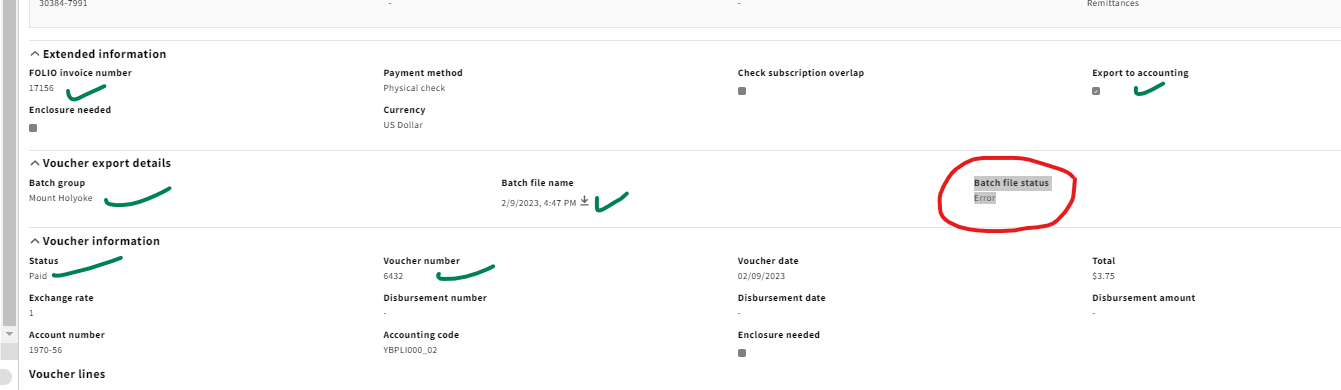
| 102 | Invoices: if Voucher Export is run withOUT a server to Upload to then download is possible but Batch file status displays as Error | OPEN | With UXPROD3600 (Morning Glory) one can now manage Voucher Export without needing access to Settings–which is great!! BUT since FOLIO is unable to upload to a secure ftp server (just yet?!) and our College will not provide us access to anything but a secure server, we run the Voucher Export and then download the file and "manually" handle the rest ... So far so good as far as being able to get Invoices/Vouchers to our College's AP department to be paid. HOWEVER, the Batch file status displays as Error, which is really confusing, because it makes it seem like we were not able to get the Invoices/Vouchers out to transfer to AP. and
Could there be a third option, Error or Failed, for when it truly failed; Uploaded for when it successfully uploaded to a server; and then something (Batched ??) for when a Batch file was created that is available for download/export but not also uploaded anywhere. Seeing Error in Voucher export details on Invoices is especially confusing. |
| July 21, 2023 Aug.8. 2023 | Sara Colglazier (MHC/5C) | Julie Brannon (old account) Duke University | ||
| 105 | Orders → Search for POLs in search and filter pane via instance HRID? | IN PROGRESS | Are there any plans to make the HRID of the linked inventory entity searchable? The POL should be able to easily access this via the UUID link. If the POL is linked to an instance, the search for the instance HRID would be possible automatically. If you also link the Holdings with the POL, you can also search for Holdings-HRID. Use selects index and executes a search for the POL based on either Instance HIRD or Holdings HRID. In the case of a package POL there might be multiple HRIDs that would return the POL. |
| Aug.15, 2023 | Martina Schildt | VZG | Dennis Bridges to create JIRA for adding these two search indexes to the POL search area. These may only be possible by changing the search technology used by the orders app. If so this ticket should be linked to the feature for converting orders search to elastic search. | ||
| 107 | Add "Reporting Code" field to Invoice and Purchase Orders | OPEN | Lehigh would be interested in a functionality that adds a Reporting Code (similar to Method of Acquisition) that helps track non-Acq. related data points (eg. "DEIA Shelf Project") This should be report-able via LDP. And uses vocabulary that we can edit. There is an ask from the reporting group to identify things that are bough for specific projects. These projects span multiple projects. The amounts need to be as accurate as possible to satisfy auditing requirements. Questions:
Note: Even though this code is identified at point of order there could be reporting benefits to having it be inherited by invoice AND transactions (Encumbrance, payment, credit). | Aug.15, 2023 Aug.18, 2023 | Ask Owen to provide review of supplementary properties and confirm whether any of that work could be reused to address this issue. Could be an alternative to using custom fields or enhancing tags. Dennis Bridges to start wiki page that explores pros and cons of multiple approaches. 1 use custom fields, 2 enhance tags, 3 add specific controlled vocabulary to order and invoice. | ||||
| 111 | Widgets in Dashboard for Acq Apps | IN PROGRESS | Are there plans to create widgets for acquisitions apps in the Dashboard? I could see this being really helpful with Orders or Invoice information. The specific case I can think of currently would be filtering based on the "Subscription To" date in Orders to let me know when our ongoing direct orders are due for renewal. Or maybe the ability to filter on dates in Invoices to approximate when ongoing orders should be paid by in the following year. |
| Nov.28, 2023 | Kimberly Pamplin TAMU | Suzanne Mangrum Martina Schildt : the Bienenvolk development team is starting to extend the Dashboard functionality to add an ACQ related widget - would be good to have Owen Stephensas PO attend this discussion. | Adding this topic to a Friday SIG meeting agenda so that Owen can participate. Currently no features written but if we can collect some use cases in that meeting we can work on creating features for prioritization. | |
| 114 | Organization | IN PROGRESS | Organization interface types are currently hardcoded. Universita Degli Studi Di Modena E Reggio Emilia has suggested that we add a new type for "Holdings". Are there other institutions that would like to see more values added to the list of interface types? Should this be enhanced such that users can added new types as controlled vocabularies in settings? |
| Jan.23, 2024 | Universita Degli Studi Di Modena E Reggio Emilia | Martina Schildt VZG|GBV | Initial discussion didn't reveal any additional type that would be desired. Could you provide a little more information about how you would use the "Holdings" type and why you would want to use any of the other types for this purpose. The simplest approach might be just adding this additional type. VZG: We would like to add the type "metadata" or have the list a configurable list. Dennis Bridges | |
| 118 | Orders: Create PO Line: Physical Resource Details | PENDING | Create Inventory drop down does not have "Item" as a choice. This is problematic when ordering replacements or intentional duplicates. There is no way to only add an item to an existing Holding & Instance. Also, we would like to discuss being able to add a temporary location in the order for an item that is created. This would help us to differentiate items that need to be marked as non-requestable prior to receiving in a local workflow. We are interested to know if this would be helpful to other libraries and if this would be added value to FOLIO. Temporary location: Library has system where faculty recommend a purchase and as soon as that comes in the item can be requested (Or fill a title request). Ideally they are able to prevent this from happening. | 27 June 2023 | Kimberly Smith MTSU | Kimberly Smith is going to checkin with acq folks and confirm whether there are any outstanding requirements here. | |||
| 120 | Finance: change presettings for search & filter | OPEN | We would like the status filter to be set to "active" by default when opening the Finance app. We would like to do this in the ledger tab as well as the group and fund tabs. 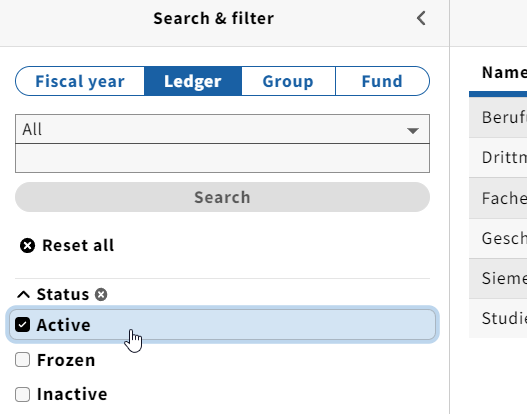 | 19 July 2023 | TP-ERW BVB | Dennis Bridges will add this to User based preferences UXPROD-1398 - Getting issue details... STATUS | |||
| 122 | Method of Acquisitions | OPEN | Could we make it so we can delete default Method of Acquisitions in the PO line creation dropdown? It gets in the way of staff UX here at Lehigh. It is unclear if this is adequately handled by UIOR-1140. Reported by Daniel Huang and Maccabee Levine | 15 Aug 2023 | should be handled by | ||||
| 123 | Receiving App: Fields from Holdings/Item level in piece Information | OPEN | At the moment there are just some fields from Holdings and Item level in the piece information.
2. If the fields on Holdings and Item level in the Inventory App are populated afterwards, it should be also possible that these information are also shown in the fields in the piece information. | 06 Sept 2023 | Some issues: how complicated do we want the UX to be? What happens if there is conflict between the piece data and the item data? What about when call number is managed in the holdings record? Some libraries do not want to have the call number controlled or entered at the piece level. | Sabrina Bayer | Hold conversation for Quesnelia | ||
| 125 | Problems in handling Multi-Volume Sets | OPEN | One-Time Orders of Multi-Volume Sets are problematic in FOLIO currently [Orchid]. Multi-Vol sets come in various flavors and with different scenarios: (1) It is known at the outset that it is a multi-volume set. There is a single price, but 2+ items that are sold as a single (1) unit. In this case one can choose to either (a) use the Receiving Workflow option of Independent Order and Receipt Quantity and keep the Cost Quantity physical & Location Quantity physical as 1, OR, (b) divide the vendor's unit price by the number of expected items and enter it as the Physical Unit Price and set the Cost Quantity physical & Location Quantity physical to the expected items number so that the total for the Estimated price = the vendor's unit price. And then Open the Order. If one goes with option (a) then after receiving all pieces, one has to remember to return to the POL and change the Receipt Status to Fully Received otherwise the Order will not Close after also being Paid. In the case of option (b), the Order will Close automatically on its own after the last piece is received and the invoice paid, and all the items are created at the time of opening the order [so if needed one can place holds on all of them at that time] BUT the single unit cost is divided across them. (2) It is NOT known at the outset that it is a multi-volume set, there is a single price, the vendor indicates a single unit for sale, but in fact there are 2+ items. Assuming it is undesirable to UNopen the Order again--otherwise one could could open it again & handle like described in (1)--but if unopening again is not desirable then one can either (a) use the Receiving App to receive one of the volumes so that it is linked up with the POL and Inventory–adding info in the Piece Comment field to show on the Holdings record and Notes variously–besides then in Inventory creating the additional Items directly, on the same Holdings record with the Comment, and adding Notes to the Item etc. ... OR (b) edit the POLs Physical Unit Price to X# so that when one then creates additional Expected Pieces in the Receiving App on the Receiving record, which then triggers the Cost Quantity physical & Location Quantity physical to increase one ends up with the orginal Estimated price = the vendor's unit price again. Basically implementing (1b) above after opening with the same +/- (- = the single unit cost is divided across the items). As to (2a) the issues are: additional Items are not linked to the POL via Receiving App Pieces and do not show in the Receiving Record, etc. & the Receiving Note may be missed, which may indicate that the Items are Requested, so that only the one initial Item has a hold and not the whole set. (3) It is NOT known at the outset that it is a multi-volume set (there is a single price, the vendor indicates a single unit for sale, but in fact there are 2+ items) AND the POL has already been Fully Paid (as a single unit re: cost & quantity). At this point--as far as I can tell--while one is still able to edit the POLs Physical Unit Price, one is NO longer able to create additional Expected Pieces in the Receiving App on the Receiving record. So at this point then the options become (a) to handle like (2a), OR, (b) to Cancel the Invoice, then proceed according to (2b), and then re-entering etc the Invoice. Now however is not only the single unit cost divided across the items, but also (a) one has to tweak the invoice number to make it unique from its first-now cancelled version AND the manual entry of the invoice pulls in the now Cost Quantity physical which is greater than 1 [this may also happen for (1) and (2) depending on when the invoice is entered or EDIed into FOLIO and linked up to the POL]. What would be great [and I think take care of all of the above outlined scenarios] is re: One-Time Orders set to Receiving Workflow: Synchronized Order and Receipt Quantity [and actually generally too] if (a) the Cost Quantity physical and Location Quantity physical were not tied to each other. That is, that they did not have to match. And (b) for the Receiving Expected Piece quantity not to be tied back to the Cost Quantity physical but only tied to the Location Quantity physical. And (c) for POL Receiving Workflow: Synchronized Order and Receipt Quantity, it NOT be the creation/adding of Expected Pieces in Receiving that changes the quantity of the POL Location Quantity physical, but rather the other way around. That is, one would have to be able to edit the number of the POL Location Quantity physical and that then would change/add how many Expected Pieces there would be in Receiving. & The POL Receipt Status would have to be tied to the Location Quantity physical and not to the Cost Quantity physical. | 10 Oct 2023 | 4/26/2024 & again 8/6/2024 | Sara Colglazier & for ACQ SIG meeting 2023-10-10 | Skidmore College | Disassociate cost quantity from location quantity? How do others handle this? Skidmore: if the invoice as set, it is received as an item and cataloged individually. Continue conversation | PO to create Jira. Could be more than one approach. 1) make it possible to set a specific receiving quantity for synchronized orders. 2) Allow user to change receiving workflow to independent but make it possible for order to resolve automatically when last piece is received. |
| 129 | Organizations: add a multi-select option for languages | OPEN | As a user I need to add multiple languages to a contact person or the general contact information.
Use case: |
| Martina Schildt | ||||
| 133 | Orders/Inventory: Move holding/item data in Inventory should update POL-Instance connection accordingly | IN PROGRESS | Move of holdings/items from one instance to another won't transfer the POL information from the origin to the target instance. Exisiting JIRAs:
Workaround: initiate the move from the order rather than the inventory record for any inventory records that have related acq data. But: Initiating the transfer in the Orders app won't work in all scenarios, e.g. when the move of holdings is triggered in an external source and not from within FOLIO. That will most likely apply in other libraries as well, in case they let their Inventory be controlled from an external system like a union catalog. |
| Martina Schildt VZG/GBV | Changes are being made under UXPROD-4976 - Getting issue details... STATUS for the Ramsons release. This will essentially mean orders is listening for movement and correcting the references. However, it will not allow 2 items on a given POL to reference more than 1 instance. | |||
| 135 | Orders > Order Lines: Make selector a configurable list | CLOSED | In the Orders app when creating a POL, a selector can be added in a free text field. For a user it would be helpful to choose one or mutliple selectors form a multi-select list. This select list should be configurable in settings. Thereby, the input would be standardized which would enable precise searching and filtering for orders that are assigned to specific selectors. |
| Martina Schildt VZG/GBV | Be able to define selectors in list in settings Must be contributed to DI to keep field from breaking Connect to User app, with added field for filtering selectors link to users app for getting list Aaron Neslin create Jira | |||
| 136 | Invoice Lines | CLOSED | As a user I am creating and editing an invoice line for a POL in invoices app. On the POL I have added a discount. On the invoice that I receive from my vendor the discount has increased and needs adjustment on the invoice line in FOLIO. Currently, there is no way to adjust the discount amount on the invoice line, only the the total amount can be adjusted accordingly. For submission to a third party system the discount amount should be editable on the invoice line. Requirement: Display the discount amount that has been added on the POL on the invoice line. Make the discount amount editable on the invoice line. | Martina Schildt VZG/GBV | Breaking up the discount and additional cost into adjustments would risk counting these twice unless the total cost is managed correctly when the values are parsed. | Using adjustments on the POL might be a preferable approach as it would directly align POL and invoice line. Dennis Bridges to create JIRA. | |||
| 137 | Unlink orders from instance | CLOSED | When we withdraw items, we have been suppressing and marking instances for deletion, thinking that someday we will be able to delete instances. When an instance has a linked order, we've been suppressing the instance only. We'd like to ability to unlink the order from the instance, so that the instance can be deleted, but we'd like to retain the order details in the order record. Is this possible?? Use case: Cleaning up inventory to improve the search experience of the users there. However, wanting to retain the order and invoice information to understanding what was paid for that thing etc. At least for audit period (7 years) but possibly longer to inform decision making. | Michigan State | MH/5C | Need to ensure that it is possible for the order application to display and manage orders if the instance they are linked to is no longer available. Create feature for maintaining order <> inventory references when deleting instances and related Holdings and Items. NOTE: the authorities app allows users to delete authorities and covert data in MARC files to permanent data when link is removed. This might inform approach used here. | |||
| 138 | Filter by multiple funds in Invoice app | CLOSED | We've needed to pull invoice information for reporting for our Special Collections, which uses multiple fund codes. We had to do this fund by fund. It would have been more efficient if we had the option to select multiple funds for filtering. Also, the results limit to 1000 records. Can this amount be raised? It's not enough for larger reports, which we need to do from time to time. Our workaround is to break up the exports by month (or sometime biweekly) instead of fiscal year. Expected filter behavior: Allow user to select one or more Funds in filter dropdown. Show any invoices with one or more of the selected Funds. This will make the filter more consistent with Order line filter Unclear what a more appropriate result limit would be. | Michigan State | Need to create a story for Fund filter updates. see https://folio-org.atlassian.net/issues/UIOR-1269 add separate for limit | ||||
| 139 | Have option to use invoice template | CLOSED | We'd like the ability to create and use invoice templates, similar to order templates. Use case:
| Michigan State | A feature has been created for this work UXPROD-2374 - Getting issue details... STATUS please add any additional use cases comments or questions to that feature so we can continue the discussion there. | ||||
| 140 | Trigger email to requester on receipt | CLOSED | In my role as the Acquisition Librarian at NUST Library, I have identified the need to integrate the requester's email address on the order or receiving side for efficient communication regarding requested items. Enclosed are screenshots illustrating the opportunity to include the requester's email address. This enhancement would streamline the process of notifying requestors about the status of their requests with a simple click. An automated email will be dispatched stating: "The Library has received the item/book you requested, and it is currently being processed." For further inquiries, please reach out to Use case:
Questions:
| Mutirua, Katriena <kmmutirua@nust.na> NUST | Need to write a second feature as this is slightly different from UXPROD-2565 - Getting issue details... STATUS . Where the requester actually also needs a request. In this case they just want to be notified. | ||||
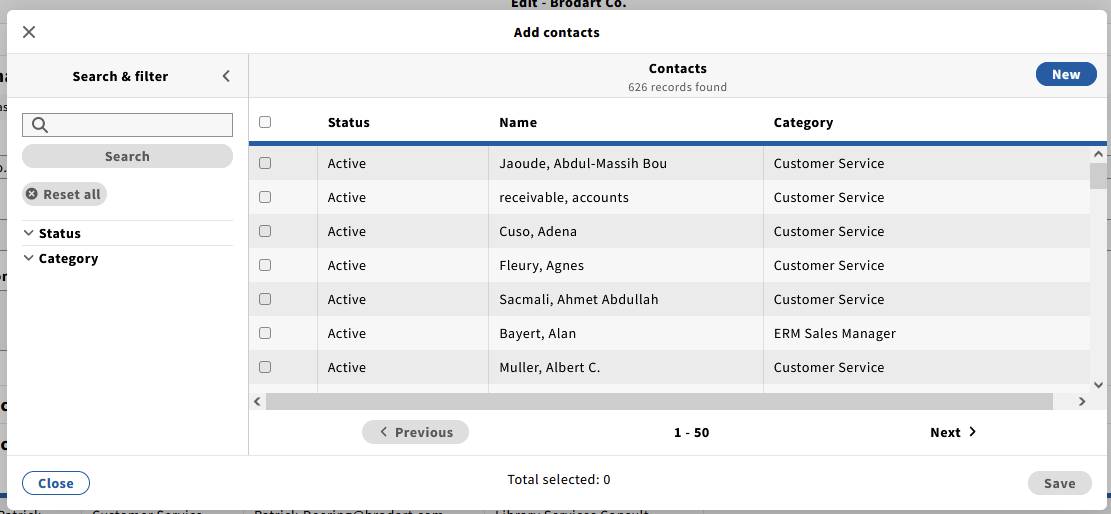
| 141 | Ability to search/filter contacts from Organization App main search | CLOSED | Right now, there isn't a way to search contacts from the side search pane for Organizations. Contacts can be found by searching the organization name, but if you know the contact name, there is no direct way to bring up the contact. There is in fact a search for contacts already, which can be gotten to by opening an Organization record, clicking edit, then clicking Add Contact. This brings up the below modal with a contact search. Since this search exists, could options to search be added to the organization side bar?
| 14 Mar 2024 | Chicago | Need to create a UXPROD feature for a contacts UI so that it can be refined and prioritized. Dennis Bridges | |||
| 142 | Orders app: When linking to an inventory instance, all product IDs should be transferred | CLOSED | In orders app, when linking a POL to an inventory instance, all product IDs should be transferred - exactly as it happens when a users changes the "Change instance connection" function. Current behaviour: If you link a POL to an Inventory instance (via title look-up), only a few product IDs are transferred: usually ISBN, ISSN and ZDB-ID. Problem: It is difficult to search in the Orders and Inventory apps if you do not know 100% which IDs are searchable. On the other hand, when a users changes the instance connection, all IDs seem to be transferred. Requirement: Functionality around the two actions should be aligned. Question: If there are several ISBNs or ISSNs, which ones are transferred (random, last one ...)? | Martina Schildt (VZG|GBV) | Need to create story to align link instance transfer of product IDs with the "Change instance connection" feature that brings ALL product IDs. Need to be mindful that this does not cause matching issues with data import before working on implementation. | ||||
| 143 | ISBN validation and order creation errors | CLOSED | In the orders app, there is fairly strict ISBN validation. Vendors, when supplying preliminary order data (or even full cataloging) often don't meet the validation standards. This has become a problem for us in particular with multiple records rejected when loading a file of orders because the ISBNs don't meet validation. Some examples:
We'd rather get these records loaded, with the incorrectly formatted or invalid ISBNs - that's the data the vendor provided. Instead, we have to create routines to clean up the ISBNs or remove them altogether. Is there a reason for why ISBN validation is so strict in Orders? Inventory doesn't seem to care. Can we relax ISBN validation rules so that these types of issues can be accepted? | 2 May 2024 | Kristin Martin (Chicago) | Sara Colglazier - additional identifiers can cause problems as well According to MM, there is no validation in inventory Order data is provisional-does not need to be source of truth Susanne Gill - it's easier to get the correct order with the correct isbn | Possible solutions: Need to investigate what consequences would result from removing the validation from orders app for ISBNs. It seems this work may have been done under UXPROD-1038 - Getting issue details... STATUS or a related feature. If orders is using this resource why is inventory not using it? | ||
| 144 | Receiving App: Inconsistency in delete holdings behavior | CLOSE | When you go into “Quick Receive” in the receiving app by clicking in the grey line item under expected, a window titled “Edit piece” comes up. If you create new holdings for location in this pop out, when you save and close a message pops up that asks if you would like to delete the holdings that were previously created in FOLIO. (This is the desired and expected behavior) When you use the actions -> receive menu under expected, there is a place to create new holdings for location, but after the location is changed the same message about deleting the other holdings does not appear. This leaves the acquisitions staff to have to go out to inventory and mark the other holdings with the wrong location for deletion. Can the delete holdings behavior happen in both places?
| 10 May 2024 | (MTSU) | Dennis Bridges in snapshot, it appears that the modal appears following the steps that Molly presented above. If instead you go to the Actions menu the Receive (next to Expected) while in the receiving app record, scroll to the right and change the location on the expected piece, the modal does not appear to ask if the user would like to keep or delete the empty holdings. The behavior is different in Quick Receive than in the receiving screen that appears navigating through the Actions menu. I also left this note on the JIRA | We believe this issues UIREC-350 - Getting issue details... STATUS has addressed the problem for Ramsons but please verify. | ||
| 145 | Organisations app and modal: always set "active" as default filter | CLOSED | When opening the Organization App, the checkbox for "Active" is not checked and the filter isn't applied. This also applies to the the search window, when selecting an organization for linking e.g. to an agreement. | Martina Schildt (VZG/GBV) | Create a JIRA for adding default of active and link to user preferences feature in support of user pref still needs to be linked to UXPROD-1398 - Getting issue details... STATUS | ||||
| 146 | Organisations app: add action to duplicate or clone an organization | OPEN | It would ease creation of reocrds if organization records could be duplicated or cloned. Similar functionality is available in Agreements/Licenses or other apps. It would be very practical to be able to duplicate organizations e.g. in the event of takeovers or mergers. A current example would be De Gruyter and Brill, which will merge in the long term. In this case, users would probably create a new organization with a different identification code in order to keep the old orders from De Gruyter and Brill separate. For the organizations, it would probably be good if it were also possible to select which information should be transferred and which should not (just as with the agreements). However, it would be good if the data record could be opened first so that further information can be added and only created after saving again. In principle, it might also be practical if you could link/merge information from different entries in the organizations app, e.g. like it is possible for contact persons and interfaces. | Martina Schildt (VZG/GBV) | Need to outline how the org should be clone regarding all of its accordions and then we can come back to it. | ||||
| 147 | Orders App/POL location of donor accordion for entry | CLOSED | The donor accordion appears above the fund distribution accordion in the POL when creating a new POL. It would be better for the donor accordion to appear below the fund distribution so the user sees any donor linked to a fund on fund entry. | @Scott Perry (UChicago) | Joseph Reimers it would be helpful to create a story for changing the order of accordions. If users have linked Funds and donors it would be better for them to see the fund field before thinking about the donor. | ||||
| 148 | Drop-down selection for ledger fiscal year | CLOSED | In the Finance App, on a Group record it is possible to select the fiscal year from a drop-down and select previous fiscal years to display information. Ledgers do not have the same dropdown option, which makes it inconsistent. We do have the ability to export ledgers, so the information is obtainable, but users must know to go through Actions > Export Budget Information and only upon clicking through will see the fiscal year option. Given that the information is available, this isn't as major of an issue, but it can make things confusing.
Use case: Librarian gets statistic from acq staff to fill out information for the Health Sciences. Being able to view at the Ledger level for previous years would speed the process. | Kimberly Pamplin (TAMU) | Dennis Bridges need to create story for add this dropdown option for ledger so that users can collect ledger data without needing to do an export. | ||||
| 149 | Reporting on serials | OPEN | For ongoing and ongoing subscription orders, libraries want to be able to produce a report with titles, amount currently encumbered in a selected fiscal year, and amount paid during a selected fiscal year. This will help with future year projections and ensuring that all subscriptions are paid during a given fiscal year. This type of report would need to encompass data from:
Right now, this process is cumbersome because you have to go to a budget record to view unreleased encumbrances then click on POLs individually to access current information. The Orders and Invoices CSV exports can get some of the information, but not all filter criteria and data points can be included within a single app export. Libraries are seeking a more streamlined approach to subscription management. | Molly Driscoll (EBSCO) with feedback from WHU - Otto Beisheim School of Management (Germany) | Stephanie Larrison | ||||
| 150 | Receiving | IN PROGRESS | In Receiving App → Expected accordeon → Actions → Receive Is it possible to have this box checked by default if there is only one piece to receive? | Marie Meyer TP-ERW BVB | When there is a single piece to receive, then the "receive" checkbox is checked by default | Aaron Neslin to write up issue | |||
| 151 | Orders Search - open single result; close pane for multiple hits | IN PROGRESS | In Inventory when a search produces only one result, the record is opened automatically. (See UIIN-58 - Getting issue details... STATUS ). A good example of this is when searching with an instance HRID. When a search is performed while a record is open, it will either open the record for the new search match or in the case of multiple results it will close the third pane to allow the user a full view of all search results. This saves the user time and clicks when searching. Orders does not function in the same manner, requiring the user to click into or out of records. Is there any way this can be recreated in the Orders and Order Lines searches? We are in Nolana, but I have tested this in Quesnalia BugFest as well. | Kimberly Pamplin & Heather McMillan (TAMU) | Stephanie Larrison | When there is an single match for an Orders and order lines, the order line or order record is opened. This is a convince issue that saves clicks When a new search is done in orders or order lines and a record is open, then close the currently open record before displaying new results In invoices, and Receiving as well | Aaron Neslin to write up | ||
| 152 | IN PROGRESS | Many libraries use external sources to populate Inventory, e.g. via Union catalogues. In those cases, new instances, holdings and items will be generated in FOLIO Inventory as soon as a library adds an ietm to an instance in Union catalogue. For those resources, the usual PO and POL is created in FOLIO Orders, "Create Inventory" field is populated (via the drop-down) with "None", "Instance" or "Instance, Holdings". When the resource then is in receiving process, there is no way to add an accession number or barcode in FOLIO Receiving - neither via Number generator nor via manual input, as the relevant fields are deactivated when no item is created in Inventory. Can we find a way to add a barcode, accession number and/or call number - either via using the number generator or via manual input - for ordering without item creation in Inventory? E.g. add a seeting to activate/deactivate the number fields in receiving depending on your workflows. In this workflow the Receiving record is created first and the order does not generate the item. The items are created in the union catalog. Are there other use cases where libraries may want to link inventory records to an order but not have FOLIO generate those stub records in advance?
| Martina Schildt | Add new "link existing item" toggle to piece record that is available when "Create inventory" is set to Instance, holdings OR Instance, Holdings, items. When link existing is checked user can select a specific item record to link to piece. When linked any generated item record is deleted. Data from linked item updates piece data. Dennis Bridges to create JIRA. | |||||
| 153 | Re-open an invoice that is in approved status | OPEN | If an invoice is put into approved status and the accounting code needs to be changed it would be nice to re-open the invoice so it can be edited. The same is true when the amount is off in the FOLIO invoice from the actual invoice. We want to be able to edit the amount to correct it. Simple edits that can't be made now once an invoice has be put into approved status. If the invoice was marked to generate a voucher by having the "Export to accounting" box checked, then we'd need to fix the voucher file to remove the bad invoice. | ||||||
| 154 | Updates to account numbers in organizations do not reflect in POLs | IN PROGRESS | Sometimes we update or make changes to vendor account numbers in the Organizations app. These account numbers can be connected to thousands of POLs, but the change made in Organizations does not impact those POLs. That means for the data in the POLs to be correct, we have to go and update every single purchase order line. At this point that also means unopening the POs, because account number is locked. Is there any way that an update in Organizations could carry over to the POLs? Use cases: If wanting to keep the historical data of the account number in past POLs we would create a new account number.
The vendors account number could change from various reasons, vendor implements new system, account numbers are merged. In these situations it would not be relevant to keep previous numbers in tact and we would just like to change the number across all existing POLs. The invoice account numbers SHOULD NOT be updated retroactively they should be frozen. | Kimberly Pamplin (TAMU) | Need to create Jira story to represent this change. May require the use of UUID for account numbers. Need a way to accomplish this without loosing the ability to search POLs by account number. | ||||
| 155 | Budget Overview details for Funds (on any of the Finance related views for Funds: Fiscal Year, Ledger, Group, Fund) | IN PROGRESS | As an acquisitions staff member, there is need of a more detailed budget overview for Funds (on all the Finance related views for Fund), in addition to Name, Code, always also include Allocated, Unavailable split out to show it in detail as Encumbered, Awaiting Payment, and Expended separately, Available as well as Net Transfers. Use cases: When reviewing budgets in meetings we may need to review a subset of Funds with a group, reviewing the detailed financial information. Allocated, Unavailable, Available is typically not enough information. When reviewing budget values to aggregate money into a specific fund for spending this would be really helpful. | 3 Dec 2024 | Sara Colglazier for Five Colleges | Create Jira for displaying the current budget details in the second pane of the finance app with the Fund tab selected. This area should also give the user the ability to show/hide columns as has been implemented in the receiving UI and other areas of FOLIO. | |||
| 156 | Invoices - Ability to see External Account Number division before payment? | IN PROGRESS | When we process invoices for our business office we fill out an electronic stamp that documents certain information on the actual invoice PDF. One component of this is the external account number. Our invoicing person fills out the stamp and then marks the invoice as "Reviewed" for our colleague in the business office to approve and pay. When there is only one external account number for the whole invoice, this is a very straightforward process. When we need to split funds though, it can become a headache for the invoicing person to sift through each invoice line and determine how much money is being paid out of the different accounts. When the invoice is paid, a lovely table listing the external account numbers and their amounts is displayed in the Voucher information accordion. Is there any way that this could be displayed before the invoice is approved/paid? Or is that impossible with the way payment and transactions currently work.
| Kimberly Pamplin (TAMU) | Suzette Caneda (Stanford) | Need to create JIRA. proposed solution is to have the Voucher information accordion appear even when the invoice is Open or reviewed but only show the Voucher lines table in it with values calculated on the fly. Possible labeling it "Voucher lines preview" | |||
| 157 | Finance - move all open POLs from one fund to another | IN PROGRESS | We would like to move all open purchase order lines from fund A to fund B with one simple function. Background: During the year we have to do this really often, for example when the money of fund A is already expended but we still have lots of open orders on this fund A that then all need to be paid from fund B. In our current system this is possible with just a few clicks.
Note: This is essentially a bulk edit feature but the system would be editing one of the fund distributions on the related POLs to some other Fund id. | 13.12.2024 | Marie Meyer TP-ERW BVB | This would be related to UXPROD-4014 - Getting issue details... STATUS but the timeline for this feature is unclear. | Need to check with Magda to be certain that the scope is covered. If not will need to create new feature | ||
| 158 | Encumbrances | IN PROGRESS | Looking at encumbrances, something isn't working quite right. This POL was setup 4/20/2022, as of yesterday was showing unreleased in FY2023, FY2024 and FY2025. I did release the encumbrance for FY2025 yesterday - but I had run the Recalculate Budget totals on this fund in November - why didn't this encumbrance clear up then? Also why hadn't it cleared up when our FSE ran the script for us to clear up encumbrances. We are trying to verify a report that we have developed to report encumbrances
| 12/17/2024 | Ann Cowley | EBSCO is investigating this issue. Partially resolved under MODFIN-394 - Getting issue details... STATUS . However, there are still encumbrances that are not being released by the encumbrance script. Need bug created. Ann is going to create a ticket for the remaining issue here. We will link it when we have had a chance to investigate further | |||
| 159 | Finance - prevent login during FYRO | IN PROGRESS | To rule out possible errors caused by POLs being changed during FYRO, only one specific user should be able to log into FOLIO during this time. This user should have the permission of preventing all other users from logging in, as well as enabling them to log in when FYRO is completed. Use case:
Requirements
| Lucas Moder TP-ERW BVB | Need to create a Jira for allow users to Freeze acquisitions activity for all "records" related to a specific ledger. Essentially preventing edit, create and delete while restrictions apply. They one user should still be able to do the work. Alternate approach would be "disable certain roles". This might be addressed by the introduction of Eureka and Time based Policies. | ||||
| 160 | Finance - add additional column at budget summary overview | IN PROGRESS | In the budget summary overview of expanse classes, there is a column entitled “Percentage of total expenditure” and the percentage refers to the allocated budget. We would like to make two columns out of this: Once the percentage of the respective expense class based on the allocation (How much of my fund is planned for which expanse class?), once the percentage of the respective expense class based on the actual expenses (How much have I spent of my fund so far or in the respective FY for which expanse class?). Add a column for "Percentage of total allocation" that calculates how much has been expended on a given expense class of the total allocated. User wants to know for each expense class, based on what was budgeted how much has currently been spent against it. Use cases:
| Lucas Moder TP-ERW BVB | Dennis Bridges Need to create Jira ticket to schedule implementation of this ui-only issue. Column added to expense class table both at Budget and Group level. | ||||
| 161 | Organizations app > "Alias": show alias description in view mode | IN PROGRESS | GBV libraries are recording the vendor code from the previous system (LBS) as alternative name in organization records:
Until Poppy, both alias and description were displayed in the organization's records view mode. Now only the alias is displayed. To see the description, the user has to open the record in edit mode. Not every user of FOLIO will have permissions to edit the record. It is also cumbersome to add more clicks just to see the description of an alternative name. Especially, if you add multiple aliases to your organization record, the description in view mode is needed to distinguish between those. | Martina Schildt (VZG | GBV) | Need Jira bug created to add description back to the view pane | ||||
| 162 | Invoices: Ability to enter the final price later or update the cost data after receiving the account statement (MBS) | OPEN | Requirement raised in OA SIG - will be demoed on After approving and paying an invoice, some libraries need the ability to adjust the final price later or update the cost data after receiving the account statement (MBS) in a third party system. Reason: It takes several weeks for administration to pay the invoice, so the exchange rate stated when creating the invoice is almonst always incorrect. For those libraries who need this feature it is very important. | Martina Schildt on behalf of Christina Prell | |||||
| 163 | Invoices and OA: Link from invoice app to OA app via invoice number | OPEN | Requirement raised in OA SIG - will be demoed on This is often used for further processing or inquiries from authors | Martina Schildt on behalf of Christina Prell | |||||
| 164 | Invoices and OA: Link OA invoice from the publisher with an in-house invoice to the corresponding author | OPEN | Requirement raised in OA SIG - will be demoed on Link OA invoice from the publisher with an in-house invoice to the corresponding author (Example DEAL Gold OA, possibly link from Agreements or Invoice?) | Martina Schildt on behalf of Christina Prell | |||||
| 165 | Bug? - Reopened order status in Holdings retains reason for closure. | IN PROGRESS | While testing linking our POLs to Holdings now that we are in Poppy, I noticed that a reopened order will maintain it's reason for closure in the Holdings record, which makes it a bit confusing. I'm assuming this is just a bug and needs a ticket? It happens in Ramsons BugFest too. It's not as common, but there are cases for ongoing orders where a title will cease and then come back or we might cancel and then reinstate.
| Kimberly Pamplin (TAMU) | Dennis Bridges Create Jira bug for this story. FOLIO is not clearing the reason for closure when an order is unopened. It is already stored in version history for reference. | ||||
| 166 | Enhancement request - Automatically expand the notes accordion when notes are present | OPEN | (Recording this enhancement in the context of the Organizations app, but would love to discuss how this could be implemented in any app where Notes are used.) Organization records may require the addition of important contextual/instructional information over time. This information is best suited to notes so that dates/times can be recorded and information can easily be edited/deleted as needed. However, it's easy to miss these details because the numeric indicator is quite subtle. Would it be possible to expand the notes accordion by default on records where notes exist? | Molly Driscoll (EBSCO) on behalf of Eastern University | |||||
| 167 | Invoices - "approve" and "pay" | IN PROGRESS | Currently, "approve" and "pay" are either two different options in the actions menu, or one option that combines both. In the settings app (invoices → approvals), the preferred option can be chosen, which is then bound for all users. Depending on different types of invoices, it would be useful to be able to choose from both options for each invoice. The decision should be made in the actions menu of each invoice instead of being defined in the settings app. Use case: Users may need to update invoice information for invoices in foreign currency. Even though they tipcally approve and pay invoice for these foreign currency invoices they need to approve and pay separately. Some libraries will still only want one option as they never only approve invoices. | Lucas Moder TP-ERW BVB | Create Jira story for adjusting the setting for approve and pay to allow users to chose whether they want ONLY approve and pay OR both "Approve and pay" and "Approve" as actions in the menu. | ||||
| 168 | Allow user to edit notes on closure post closure | OPEN | After closing order there are reasons why a user may need to edit the reason for closure When an Ongoing Order POL (in cases where there is only one POL) has its POL Receipt Status & Payment Status changed to Cancelled (currently the only option besides Ongoing) then the PO's Workflow and Reason for closure automatically change to Closed (Workflow status) and Cancelled (Reason for closure) without giving the user the possibility of adding a Notes on closure. There is no way then to add a Notes for closure since one cannot edit it after the Order is Closed. | February 18, 2025 | Sara Colglazier (MHC/5C) | ||||
| 169 | When an Ongoing Order is Closed for a reason, corresponding reasons should be available for POL's Receipt Status & Payments Status as well and trickle down from PO | OPEN | Currently (at least in Quesnelia) for Ongoing Order POLs the only options for the POL Receipt Status & Payment Status are Ongoing or Cancelled. There need to be more options for the POL Receipt Status & Payment Status, and they should align with the Reasons for closure from the PO. Like, Title change, Cancelled by Vendor, Ceased, Complete, Merged with another title, etc etc. ... These reasons in fact are applicable to the POL–since it is in fact the thing ceasing, title changing, etc. It would also be helpful if the behavior of the POL Receipt Status & Payment Status being set to Cancelled automatically Closing the PO for Reason for Cancelled, when there is just one POL, would be replicated in the opposite direction, too. That is, when there is only one POL on an Ongoing PO, and the PO is Closed for a Reason with a Note, etc, then the POL's Receipt Status & Payment Status should automatically be set to whatever the Reason for closure at the PO level was set. | February 18, 2025 | Sara Colglazier (MHC/5C) |